Sale!

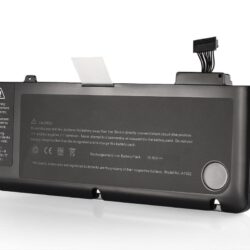
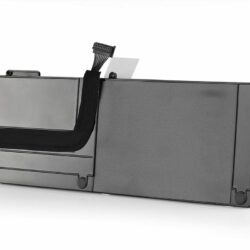
Lap Gadgets New Apple MacBook Air Battery for A1466 A1369 A1496 A1405 battery 4800mAh

🔥 125 sold in past months!

Original price was: ₹5,999.00.Current price is: ₹2,899.00. Incl GST

-52%
🔋 68,773+ Batteries Delivered
🛡️ 98.6% Compatibility Success
🔋 15+ Years of Expertise
★★★★★ 4.4 1.4K Reviews
  • High quality replacement battery with high capacity cells of 4800mAh
  • Brand: Lap Gagets |Voltage: 7.6V |Capacity:30Wh |Number of Cells: 4 cells
  • Compatible for Apple MacBook Air 13.3″ A1466 Apple A1496 A1405 A1369(EMC 2469), A1405, A1466(EMC 2559), A1466(EMC 2632), A1466(EMC 2925), A1466, A1496
  • Warranty: 12 months carry in replacement warranty by Lap Gadgets
  • Reach our Apple product expert at +91-261-4517787 for more information.
  • Package Included 1pcs Laptop Battery, Two Screw Driver
🎉 SPECIAL DISCOUNT OFFERS
🎁 10% OFF on All Orders
💙 12% OFF on Orders ₹3,499+
🔥 15% OFF on Orders ₹5,000+
🏷️ Your Coupon Awaits at Checkout!
Find your coupon code at checkout & unlock extra savings! 🎁
Add to Cart
macbook air battery
Lap Gadgets New Apple MacBook Air Battery for A1466 A1369 A1496 A1405 battery 4800mAh
₹5,999.00 Original price was: ₹5,999.00.₹2,899.00Current price is: ₹2,899.00. Incl GST
Lap Gadgets laptop parts compatibility expert
🔍 FREE PARTS COMPATIBILITY CHECK

Not Sure If This Part Fits Your Laptop?

Buying a laptop battery, charger, keyboard, screen or another spare part? Share your laptop model or existing part number. Our experts will help verify compatibility before you order.

✓ Model Verification ✓ Part Number Check ✓ Expert Guidance
💬 Check Compatibility on WhatsApp →
Expert Ki Suno, Sahi Chuno.
✅ 100% Tested
📦 Safe Packaging
🚚 Fast Shipping
🔒 Secure Payments
🛡 7 Day Replacement
💬 WhatsApp Support
Google star 1Google star 2Google star 3Google star 4Google star 5Trustindex verifies that the original source of the review is Google.
Posted on Google Google
Swadhin profile picture
Swadhin
Google star 1Google star 2Google star 3Google star 4Google star 5Trustindex verifies that the original source of the review is Google.
Reliable, good after sales service support. Team respond even during night hours. Lap Gadgets - best Laptop Repair in Vesu Surat.
Posted on Google Google
NAVNEET KUMAR profile picture
NAVNEET KUMAR
Google star 1Google star 2Google star 3Google star 4Google star 5Trustindex verifies that the original source of the review is Google.
I needed a laptop charger urgently and I got it
Posted on Google Google
Suraj Deshbhandari profile picture
Suraj Deshbhandari
Google star 1Google star 2Google star 3Google star 4Google star 5Trustindex verifies that the original source of the review is Google.
Best laptop repair service in Vesu! ⚡ Excellent service, quick turnaround, and very professional. If you’re looking for fast and reliable laptop repair, highly recommended!
Posted on Google Google
Priya Gupta profile picture
Priya Gupta
Google star 1Google star 2Google star 3Google star 4Google star 5Trustindex verifies that the original source of the review is Google.
Best place to buy Msi Charger great service. I received the correct product, and it is working perfectly. Thank you lab gadgets!
Posted on Google Google
karthikeyan shanmugam profile picture
karthikeyan shanmugam
Google star 1Google star 2Google star 3Google star 4Google star 5Trustindex verifies that the original source of the review is Google.
Really happy with my experience here the staff was friendly
Posted on Google Google
Saiyam Singh profile picture
Saiyam Singh
Google star 1Google star 2Google star 3Google star 4Google star 5Trustindex verifies that the original source of the review is Google.
Posted on Google Google
Ishwar gohil profile picture
Ishwar gohil
Google star 1Google star 2Google star 3Google star 4Google star 5Trustindex verifies that the original source of the review is Google.
I made an order for an adaptor in good faith, later did I find my faulty adaptor was good and only the cord was the problem. I made contact, they initiated the refund smoothly without any hassle. Really happy for addressing my concerns and helping me. Thanks
Posted on Google Google
Atul Anurag profile picture
Atul Anurag

Customers also bought


Apple MacBook Air Battery for A1466

The Perfect battery for Your Mac Air A1466 on the go

Get a longer-lasting and high-performance battery for your Macbook Air with the Apple a1466 a1496 a1369 a1405 battery. It’s made of top-notch components, allowing for fast charging and extended battery life. Our prices are unbeatable in India.

Here are some tips for using the battery: charge for 2-3 cycles for optimal performance, no technical skills necessary for installation, fully discharge every two weeks to maintain battery life, and store in a clean, cool, and dry place if not in use.

If your battery won’t charge, try using a different charger to check for faults. If you encounter any other issues, resetting your SMC Rest might help (learn more here).

Compatibility

  • Genuine quality Mac parts undergo rigorous testing by qualified engineers to ensure compatibility and reliability in your Macbook.
  • Our sustaining qualification process allows for testing and certification of the newest technology on your Mac system.

Quality

  • Our Mac batteries uses only OEM grade quality components.
 

Technical Support

  • Our experienced technical support staff is available to answer any questions regarding your genuine Mac-branded parts upgrade.
  • Parts purchased from other sources will not be supported by our support experts

Warranty

  • Genuine quality Mac-branded parts mean that you will not need to worry about voiding your system’s hardware warranty.
  • Physically burned or damage part does not covers in warranty

Guides for a Healthy Macbook Air a1466 Battery

Check battery health

You can check the health of your battery in Battery preferences or the Battery status menu:

  • In macOS Big Sur, choose Apple menu  > System Preferences, click Battery, select Battery in the sidebar, then click Battery Health.
  • In macOS Catalina or earlier, hold the Option key and click the battery icon in the menu bar to reveal the battery status menu.

You'll see one of the following status indicators:

  • Normal: The battery is functioning normally. 
  • Service Recommended: The battery's ability to hold charge is less than when it was new or it isn't functioning normally. You can safely continue to use your Mac but you should take it to an Apple Store or Apple-authorized service provider to get your battery evaluated.

Diagnose battery issues

Learn how to check your hardware, identify apps or features contributing to high energy use, and resolve charging issues.

Run diagnostics

A great place to start when troubleshooting battery issues is the built-in diagnostics that are available on your Mac notebook. Learn how to use Apple Diagnostics on your Mac.

If you don’t find any issues with Apple Diagnostics, read on for more information about troubleshooting your battery.

Check the battery status menu

The battery status menu shows you how much charge your battery has and whether it’s currently charging. This menu is at the right side of the menu bar:
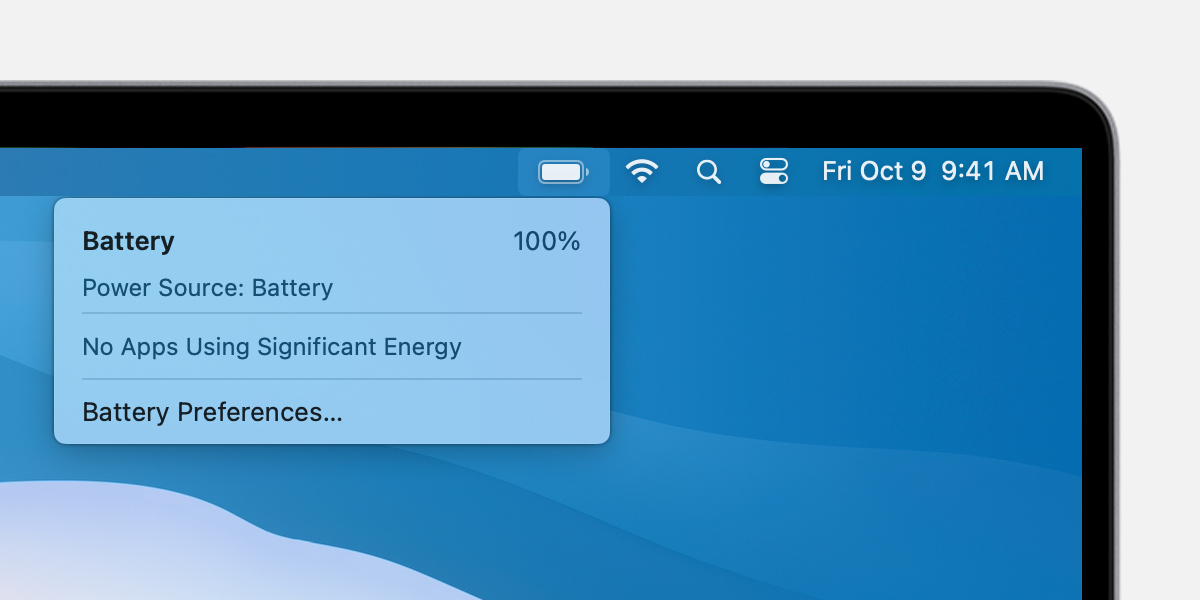
macOS Big Sur menu bar with battery menu open

The battery status menu also tells you if your display or any apps are using significant energy. Also consider closing any apps that are listed to save battery power.

If you use optimized battery charging in macOS Big Sur, you’ll see additional information when your Mac is connected to power, such as whether charging is paused or when your battery will be fully charged. If charging is paused and you need to have your Mac fully charged sooner, click Charge To Full Now.

Resolve charging issues

Get help with other issues such as if your Mac won’t recognize a power adapter or charge to 100%.

If your Mac isn’t charging

Confirm the correct wattage AC adapter for your computer. A power adapter rated for a lower wattage than is required for the system might not reliably charge the computer. If you’re not sure which power adapter to use with your computer, learn how to find the right power adapter and cord for your Mac notebook.

For more help, learn what to do if your USB-C power adapter isn’t charging your Mac notebook. If issues persist, shut down your Mac, close the display for 30 seconds, then try to charge again. Or if you have an Intel-based Mac, reset the SMC.

If your Mac won’t charge to 100%

If you use optimized battery charging in macOS Big Sur or use macOS Catalina or earlier, occasionally the battery might not show a full charge (100%) in macOS, even after the power adapter has been connected for an extended period of time. This behavior is normal and helps prolong the overall life of the battery. 

Additional information

Weight 0.5 kg
Dimensions 30 × 10 × 3 cm
Brand

Capacity

Battery Type

No of Cells

Box contain

,

Compatibility

Compatible Model

, , , , , ,

Warranty

Reviews

There are no reviews yet

Add a review
You must be logged in to post a review Log In

Q & A

Ask a question
Lap Gadgets New Apple MacBook Air Battery for A1466 A1369 A1496 A1405 battery 4800mAh Lap Gadgets New Apple MacBook Air Battery for A1466 A1369 A1496 A1405 battery 4800mAh
Your question
* Question is required
Name
* Name is required
* Please tick the checkbox to proceed
This site is protected by reCAPTCHA and the Google Privacy Policy and Terms of Service apply.
There are no questions yet