If your laptop battery is dying, draining fast, or your laptop won’t hold charge past 20 minutes anymore, buying a replacement online feels simple — until you actually start searching. You’ll find the same battery model listed by 6 different sellers at 6 different prices, half the listings look suspicious, and there’s no way to tell if you’re getting a genuine part or scrap-cell garbage in fresh packaging.
Here’s exactly how to buy the right laptop battery online in India, without wasting money on the wrong part.
Step 1: Find Your Exact Battery Model Number — Not Just Your Laptop Model
This is where 80% of buyers go wrong. Searching “Dell Inspiron 15 battery” isn’t enough — Dell alone has used dozens of different battery models across Inspiron variants over the years.
You need the battery part number, which looks something like HT03XL, C41N2009, WDX0R, or A1706. Here’s how to find it:
- Flip your laptop over. Many models print the battery part number directly on a sticker on the underside, near the battery compartment.
- Check Device Manager (Windows). Go to Device Manager → Batteries, or run
powercfg /batteryreportin Command Prompt, which generates an HTML report with battery details. - If your battery is removable, take it out and read the label directly — this is the most reliable method.
- Search your laptop’s exact model + “battery part number” if the above aren’t available.
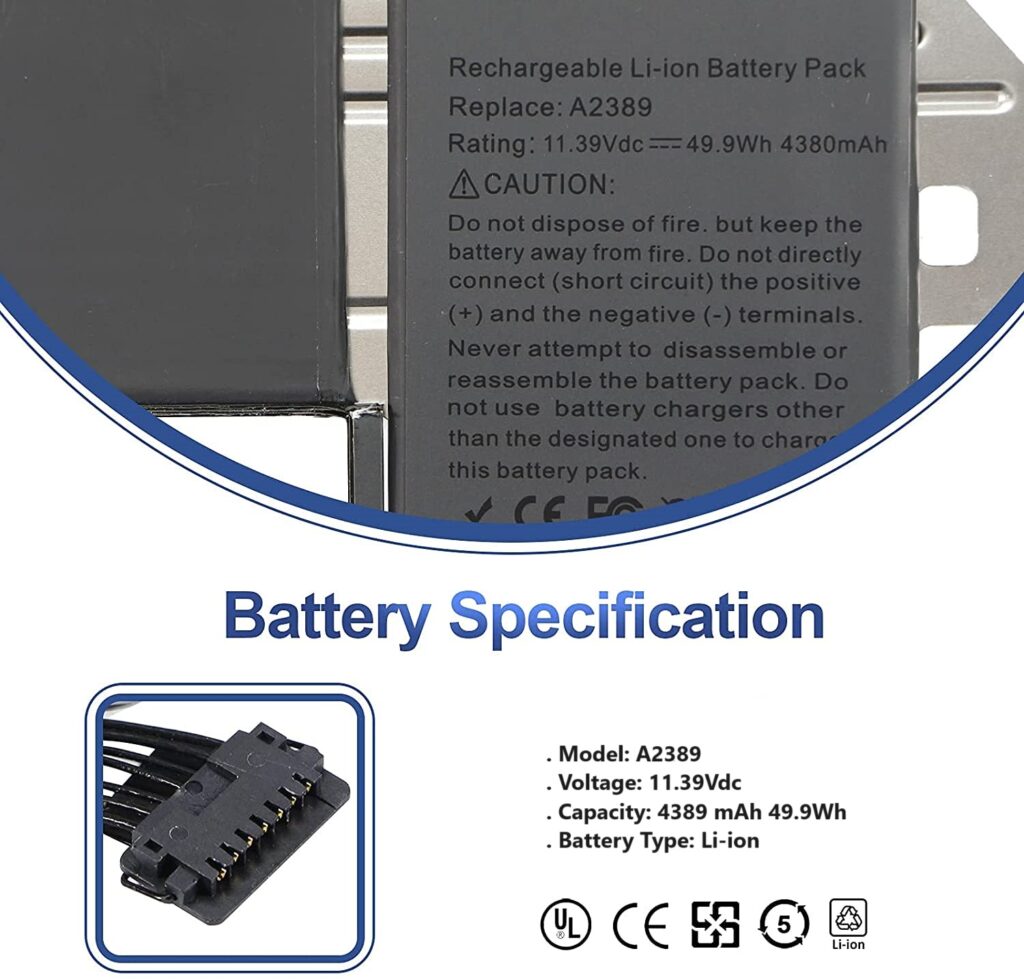
Once you have this code, your search becomes precise instead of guesswork. A battery listing that matches your exact part number is far more likely to fit and perform correctly than one matched loosely by laptop brand and screen size.
Step 2: Check Voltage and Capacity Match — Not Just the Part Number
Even with the right part number, glance at two numbers on the listing:
- Voltage (V): Must match your original battery exactly. A mismatch here can damage your motherboard.
- Capacity (mAh or Wh): Can be equal to or higher than the original, but never significantly lower. A higher-capacity replacement (common with quality third-party cells) often gives you better battery life than your laptop had when new.
Reputable sellers list both numbers clearly. If a listing only shows “compatible with Dell/HP/Lenovo laptops” and no voltage or capacity specs, treat that as a warning sign, not reassurance.
Step 3: Look for These 5 Trust Signals Before You Click "Buy"
- Cell brand disclosure. Good replacement batteries use branded cells (Samsung, LG, Panasonic, or equivalent Grade-A cells) inside the pack. Sellers confident in their cells usually mention this; vague listings often aren’t.
- Warranty period. 6 months minimum is standard for a quality replacement battery in India; 12 months is a strong signal of confidence in the product.
- Real product photos, not manufacturer stock images reused across 20 unrelated listings.
- Return/replacement policy for DOA (dead-on-arrival) units — batteries occasionally fail out of the box, and a seller who doesn’t cover this is a risk.
- Seller responsiveness. A quick message to the seller asking “does this fit [your exact model + part number]?” before ordering tells you a lot. Legitimate sellers answer specifically; resellers just copy-paste “yes it fits.”
Step 4: Compare Price — But Don't Chase the Cheapest Listing
Genuine and high-quality third-party laptop batteries in India typically fall in these ranges (as of 2026):
| Battery Type | Typical Price Range |
|---|---|
| Budget/generic cells | ₹800 – ₹1,500 |
| Quality third-party (branded cells, warranty) | ₹1,500 – ₹3,000 |
| OEM/Original from brand | ₹2,500 – ₹5,500+ |
If a listing is priced 40-50% below everything else for the same part number, that’s not a deal — it’s almost always old, refurbished, or low-grade cells repackaged as new. Battery cells are a commodity; genuinely low prices across multiple honest sellers usually cluster fairly close together.
Step 5: Check Shipping and Handling for Batteries Specifically
Lithium-ion batteries are classified as dangerous goods for shipping, which is why:
- Delivery can take 2-5 days longer than typical electronics, especially to smaller cities.
- Some couriers require the battery to ship at partial charge (30-50%), which is normal and safe — this is actually the correct storage charge level for lithium-ion cells.
- COD (cash on delivery) may not be available on all battery listings due to courier restrictions on battery shipments — this isn’t a scam signal, just a shipping regulation.
Common Mistake to Avoid
Don’t buy based on “universal compatible” battery listings unless you’ve independently confirmed the part number and voltage match. “Universal” batteries usually mean a generic shell with adapters, and fit/performance is inconsistent across laptop models.
FAQs
Is it safe to buy a laptop battery online in India? Yes, as long as you verify the exact part number, check voltage/capacity match, and buy from a seller offering a warranty. Avoid listings with no specs, no real photos, and prices far below market average.
How long does a replacement laptop battery last? A good quality replacement battery typically lasts 2-3 years or 300-500 charge cycles under normal use, similar to an original battery’s lifespan.
Can I use a higher capacity (mAh) battery than my original? Yes, as long as the voltage matches exactly. A higher capacity battery is safe and will give you longer battery backup.
What’s the difference between OEM and third-party batteries? OEM batteries come from the laptop manufacturer directly and cost more. Quality third-party batteries use similar or identical cell grades at a lower price, often with comparable or better warranty terms — but quality varies a lot between sellers, which is why checking trust signals matters.
Looking for a replacement laptop battery that’s verified for exact model compatibility, with real warranty support? Browse genuine replacement batteries at Lap Gadgets — every listing includes verified part numbers and voltage/capacity specs so you’re never guessing.