Whatsapp: chat

🏷️Save upto 18% on GST Invoice

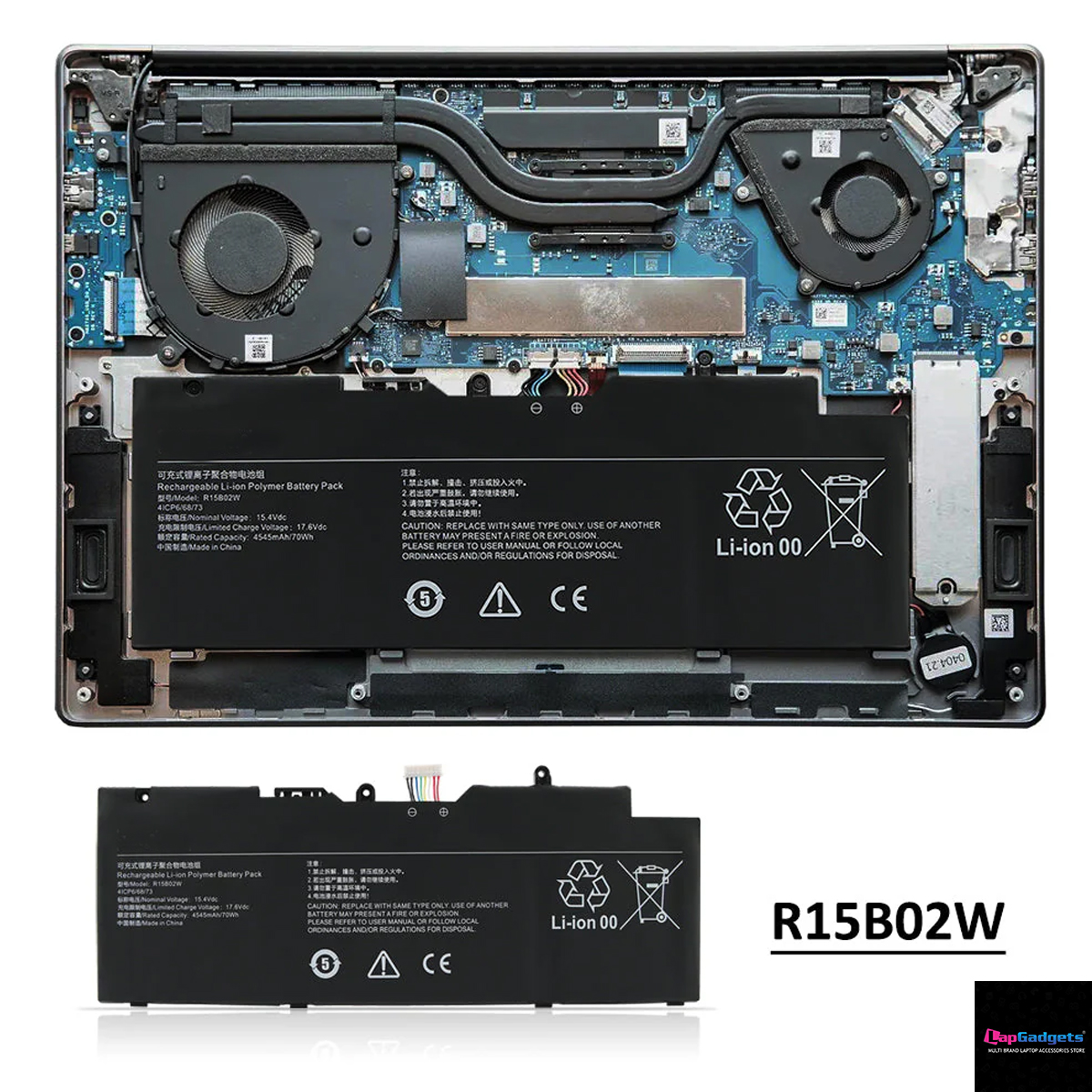
R15B02W Laptop Battery For Xiaomi RedmiBook Pro 15 R5 R7 XMA2007-BJ XMA2007-BB XMA2007-AJ XMA2007-AB 15.4V 4545mAh/70WH

Xiaomi RedmiBook Pro 15 Battery Not Charging? 7 Causes and How to Fix It

If your Xiaomi RedmiBook Pro 15 battery is not charging, you may see symptoms such as:

  • “Plugged in, not charging”
  • Battery stuck at 0% or 1%
  • Battery percentage not increasing
  • Laptop shutting down when the charger is removed
  • Battery charging only up to a certain percentage
  • Laptop not detecting the battery
  • Battery draining quickly even while charging

The good news is that a charging problem does not always mean that the entire laptop has a serious hardware failure.

In many cases, the cause may be the charger, charging port, software, or the battery itself.

This guide explains the most common causes of Xiaomi RedmiBook Pro 15 battery charging problems and how to identify when the battery needs replacement.


1. The Battery Has Reached the End of Its Usable Life

Laptop batteries naturally lose capacity over time.

After many charging cycles, the battery may no longer be able to store enough energy. Eventually, you may notice:

  • Very short battery runtime
  • Battery percentage dropping rapidly
  • Laptop shutting down immediately after unplugging
  • Battery stuck at a particular percentage
  • Battery not charging properly

If your laptop works normally with the charger connected but shuts down immediately when you unplug it, the battery may have significantly degraded.

For compatible Xiaomi RedmiBook Pro 15 models, the replacement battery may be identified by part numbers such as:

R15B02W, R15B0ZW, and 4ICP6/68/73.

If your battery is confirmed to be faulty, you can check the R15B02W Xiaomi RedmiBook Pro 15 replacement battery and verify the specifications before ordering.


2. The Battery Is Stuck at 0% or 1%

A battery that remains at 0% or 1% while the laptop is connected to the charger may indicate a battery or charging problem.

Possible causes include:

  • Severely degraded battery cells
  • Battery protection circuit activation
  • Battery communication issue
  • Faulty charger
  • Internal battery connection problem

What You Can Try

  1. Shut down the laptop.
  2. Disconnect the charger.
  3. If possible, allow the laptop to remain powered off for a few minutes.
  4. Reconnect the charger.
  5. Start the laptop and check the battery status.

If the battery repeatedly remains at 0% or 1%, it may require professional testing or replacement.


3. Windows Shows “Plugged In, Not Charging”

This is one of the most common laptop battery problems.

The message may appear when:

  • The battery has reached its maximum charge
  • Battery protection software is limiting charging
  • The battery is severely degraded
  • The charger is not delivering sufficient power
  • The battery is not communicating correctly with the laptop

First, check whether the battery percentage increases after leaving the laptop connected to the charger for some time.

If the percentage never increases, the battery and charger should be tested.


4. The Charger or Charging Adapter May Be the Problem

A battery may appear to be faulty when the actual problem is the charger.

Check whether:

  • The charger is the correct charger for the laptop
  • The charger connector is damaged
  • The charging cable is loose
  • The adapter becomes unusually hot
  • The laptop charger is delivering the correct power

If the charger cannot provide sufficient power, the battery may not charge correctly.

Important

A replacement battery will not solve a charging problem caused by a faulty laptop charger or motherboard charging circuit.

This is why proper diagnosis is important before replacing the battery.


5. The Battery Connector May Be Loose

Inside the laptop, the battery connects to the motherboard using a dedicated connector.

A loose or improperly connected battery cable can cause:

  • Battery not detected
  • Battery not charging
  • Laptop working only with the charger
  • Sudden shutdowns

If the laptop has recently been opened for repair, cleaning, SSD upgrade, RAM upgrade, or other service, the battery connection should be checked.

⚠️ Always disconnect the charger before opening the laptop.


6. Battery Driver or Software Problems

Sometimes Windows may not correctly communicate with the battery.

You can try reinstalling the battery-related device drivers.

Basic Windows Troubleshooting

  1. Open Device Manager.
  2. Expand Batteries.
  3. Locate the battery-related entries.
  4. Uninstall the battery device driver.
  5. Restart the laptop.

Windows may automatically reinstall the required driver after restarting.

This can help if the issue is caused by a temporary software or device recognition problem.

However, driver troubleshooting will not restore battery capacity if the battery cells themselves are worn out.


7. The Battery May Be Physically Damaged or Swollen

A damaged or swollen lithium-ion battery should not be ignored.

Look for:

  • Bulging laptop bottom cover
  • Raised touchpad
  • Laptop not sitting flat
  • Visible battery swelling
  • Unusual smell
  • Physical damage to the battery

If the battery is swollen:

Stop using the laptop and replace the battery safely.

Do not puncture, crush, bend, or attempt to repair a swollen lithium-ion battery.


How to Know Whether the Battery or Charger Is Faulty

A simple symptom comparison can help identify the likely cause.

SymptomPossible Cause
Laptop shuts down immediately when unpluggedBattery severely degraded
Battery stays at 0%Battery or charging problem
Battery percentage never increasesBattery, charger, or charging circuit
Laptop does not detect the batteryBattery connector or battery electronics
Charger becomes very hotPossible charger issue
Laptop works normally but battery runtime is very shortBattery degradation
Laptop does not charge with multiple compatible chargersPossible charging circuit or battery issue

This table is useful as an initial guide, but proper diagnosis may be required for an accurate conclusion.


How to Check Your Xiaomi RedmiBook Pro 15 Battery Model

Before ordering a replacement, check the label printed on your existing battery.

Look for references such as:

  • R15B02W
  • R15B0ZW
  • 4ICP6/68/73

The compatible battery specifications covered in this guide include:

  • Voltage: 15.4V
  • Capacity: 70Wh
  • Rating: 4545mAh
  • Configuration: 4-cell Lithium-Ion

Compatible laptop model references may include:

  • XMA2007-BJ
  • XMA2007-BB
  • XMA2007-AJ
  • XMA2007-AB

For compatible models requiring a 15.4V 70Wh RedmiBook Pro 15 battery, always compare the original battery label before purchase.


Should You Replace the Battery If It Is Not Charging?

Battery replacement may be appropriate when:

  • The charger is confirmed to be working
  • The laptop detects the battery but it does not hold charge
  • The laptop shuts down when disconnected from power
  • Battery capacity has significantly decreased
  • The battery is old or heavily used
  • The battery has visible swelling or damage

If the laptop does not detect any battery at all, it is recommended to check the connector and charging system before ordering a replacement.


What Replacement Battery Does the Xiaomi RedmiBook Pro 15 Use?

Depending on the exact laptop configuration, compatible battery references may include:

R15B02W / R15B0ZW / 4ICP6/68/73

The battery specification is:

15.4V | 70Wh | 4545mAh | 4-Cell Li-ion

Always compare the part number printed on the original battery before purchasing a replacement.

If your laptop uses the R15B02W battery reference, you can review the available Xiaomi RedmiBook Pro 15 battery replacement.


Expert Tip: Do Not Buy a Battery Based Only on the Laptop Name

Two laptops with similar model names may sometimes use different battery configurations.

Before ordering, check:

  1. Battery part number
  2. Voltage
  3. Capacity
  4. Connector
  5. Physical design
  6. Laptop model number

For extra compatibility confidence, take a clear photo of your existing battery label and compare all visible information.

Before ordering a replacement, read our complete Xiaomi RedmiBook Pro 15 battery replacement guide to check the compatible model numbers, battery specifications, and replacement references.


Frequently Asked Questions

Why is my Xiaomi RedmiBook Pro 15 battery not charging?

The cause may be a degraded battery, faulty charger, loose battery connector, charging circuit issue, or software problem.

Why does my RedmiBook Pro 15 turn off when I unplug the charger?

This usually indicates that the battery is unable to provide sufficient power. A severely degraded battery is one possible cause.

What battery does the RedmiBook Pro 15 use?

Compatible batteries may use references such as R15B02W, R15B0ZW, or 4ICP6/68/73, depending on the specific model configuration.

Can a battery replacement fix a laptop that is not charging?

Yes, if the problem is caused by a defective or worn-out battery. However, if the charger, charging port, or motherboard charging circuit is faulty, replacing the battery alone may not solve the problem.

What are the specifications of the R15B02W battery?

The compatible battery specification is 15.4V, 70Wh, 4545mAh, 4-cell Lithium-Ion.

Should I continue using a swollen laptop battery?

No. A visibly swollen lithium-ion battery should be replaced safely and should not be punctured, bent, or continued in use.


Final Diagnosis Checklist

Before purchasing a replacement battery, ask:

✅ Does the laptop shut down when the charger is removed?
✅ Has battery runtime become extremely short?
✅ Does the battery remain at 0% or 1%?
✅ Is the charger confirmed to be working?
✅ Is the battery model number compatible?
✅ Does the battery show signs of swelling or damage?

If the charger is working correctly and the battery cannot hold or accept a charge, replacing the battery may restore normal portable operation.

Leave a Reply
Free shipping

On all orders below 500 grams

Easy 7 days returns

Free returns within 7 days

7 days money back

If not satisfied get refund*

100% Secure Checkout

PayPal / MasterCard / Visa

Recently Purchased
✓ Verified Order

Screen connector

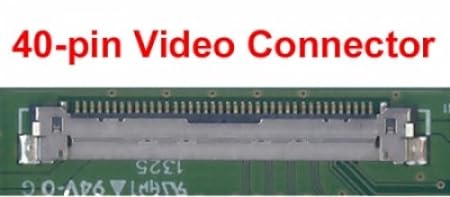
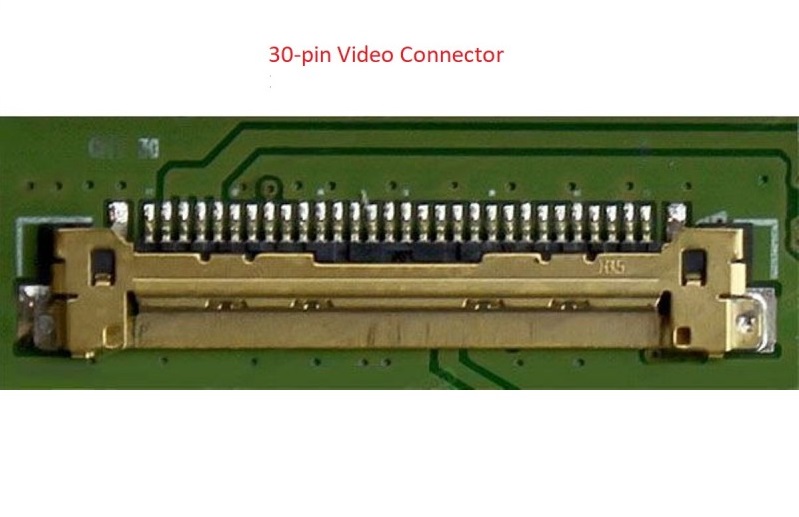
There are several different types of video connectors used in laptops screens. For the most part the connectors are not interchangeable. Here are the most common types of video connectors that are in use today:

30-pin eDP – the main modern connector.
It is used on screens with resolutions up to 1920 x 1080. If your laptop was manufactured after 2014 and features screen resolution up to 1080p it is likely using this type of connector.

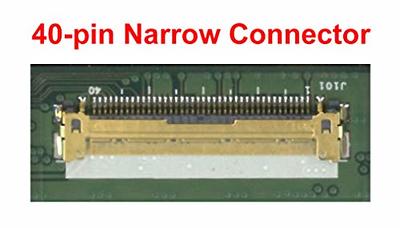
40-pin Narrow Connector
40-pin touch interface and eDP video connector used on some Lenovo laptops starting from 2020.

Narrow 40pin – pitch 0.4mm (found in Lenovo OnCell touch)
Regular 40pin – pitch 0.5mm

40-pin same physical connector standard but 3 different and incompatible signals

40-pin eDP Touch – used on newer laptops after 2015, the additional pins over the 30-pin eDP connector are needed for a built-in (on-cell) touchscreen functionality.

40-pin eDP QHD+ – used on newer laptops after 2015, the additional pins over the 30-pin eDP connector are needed for higher resolution options such as QHD (2560 x 1440) and even higher (4 channel eDP).

“40-pin eDP Touch” LCDs are not interchangeable with “40-pin eDP QHD+” screens. Even though the connectors are the same, plugging a “40-pin eDP Touch” LCD in-place of a “40-pin eDP QHD+” screen will not provide the touch functionality, and vice-versa, plugging a QHD screen in place of a 40-pin touchscreen will not provide higher resolution.

40-pin LVDS (old)

Used on most LED back-lit laptops prior to 2014. It was the most common standard at the time and allowed resolutions up to 1920 x 1080p.
Screens fitted with 40-pin LVDS connector are not interchangeable with screens fitted with 40-pin eDP because of the two different signalling technologies, even-though the connectors follow identical physical standards.


Other

120Hz+ LVDS (gaming) screens used a 50-pin connector
CCFL screens (obsolete) used 20-pin LVDS and 30-pin LVDS connectors.
MacBooks use their own proprietary LVDS and eDP connector types.

LCD Mounting and LCD brackets

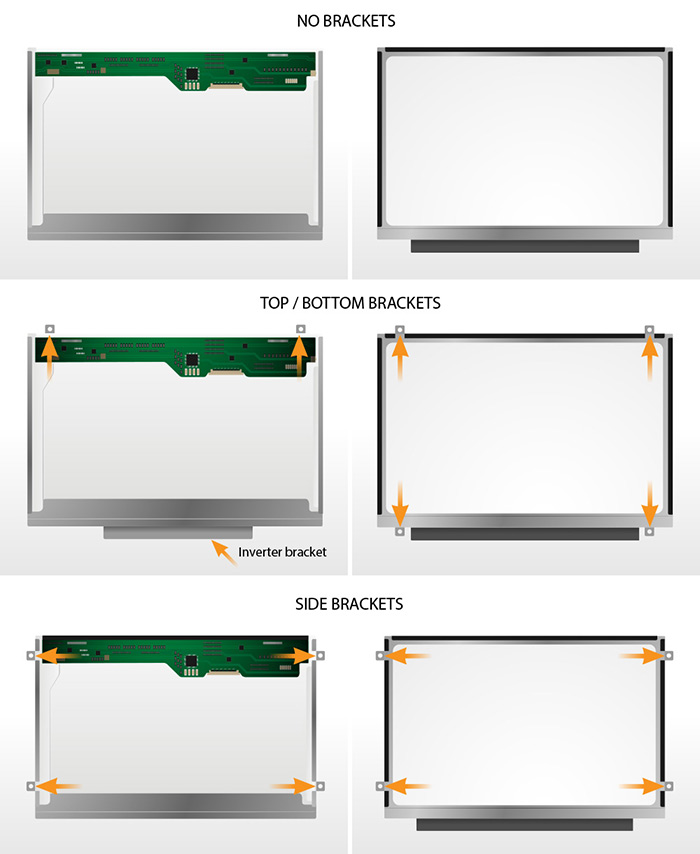
Typical LCDs are mounted with 2, 3 or 4 screws on the left and the right side of the LCD.

Some LCDs are mounted via built-in brackets.

Important! All product images match the exact bracket configuration of a replacement screen that will be sent to you. LCD brackets are built onto the LCD module – don’t confuse them with the LCD mounting brackets that are part of a laptop and should be unscrewed from the LCD and reused during the reinstallation process.

Examples of LCD mountings:

How to find screen resolution

It is important to confirm the screen resolution before submitting an order: the same laptop model can come with different display resolutions.

If a laptop you are ordering a screen for works – turn it on and:

– go to On-line Resolution Check

OR

– for Windows XP, Windows 2000, Windows ME, Windows 98: Right-Click on Desktop -> Properties -> then in Display Properties navigate to Settings
– for Windows 10 and Windows 7 & Vista: Right-Click on Desktop -> Personalize -> Graphics Options

If a laptop you ordering a screen for is not functional:

– we recommend to pull your defective screen out and google screen model for specifications. You can find the screen model number on the sticker on the back of the screen. Check out our How to check your LCD screen model number article.

OR

– check your laptop manual under the laptop specifications section if you have one.

OR

– also you may be able to find you laptop specifications on manufacturers website using the laptop serial number, service tag or the model number (in Support section).

Letters on the right are the common abbreviations and can be used as resolution indicators.

3840 x 2160 (UHD) 4K
3200 x 1800 (QHD+)
3000 x 2000 (PixelSense, MS Only)
2880×1800 (Retina, Apple only)
2560×1600 (Retina, Apple only)
2560 x 1440 (QHD / WQHD) 2K
2304 × 1440 (Retina, Apple only)
2048 x 1536 (QXGA)
1920 x 1200 (WUXGA)
1920 x 1080 (WUXGA) Full HD
1680 x 1050 (WSXGA+)
1680 x 945 (WSXGA+)
1680 x 900 (WSXGA+)
1600 x 900 (WXGA++) HD+
1600 x 1200 (UXGA)
1440 x 960 (WXGA+)
1440 x 900 (WXGA+)
1400 x 1050 (SXGA)
1366 x 768 (WXGA) HD
1280 x 1024 (SXGA)
1280 x 720 (SD+)
1280 x 854 (WXGA)
1280 x 800 (WXGA)
1280 x 768 (WXGA)
1152 x 768 (WXGA)
1024 x 768 (XGA, outdated)
1024 x 600 (WSVGA, outdated)
1024 x 576 (WSVGA, outdated)
800 x 600 (SVGA, outdated)
640 x 480 (VGA, outdated)

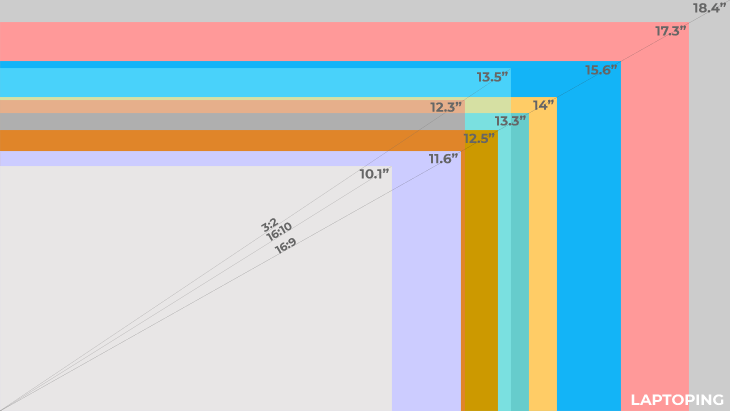
How to measure laptop screen size

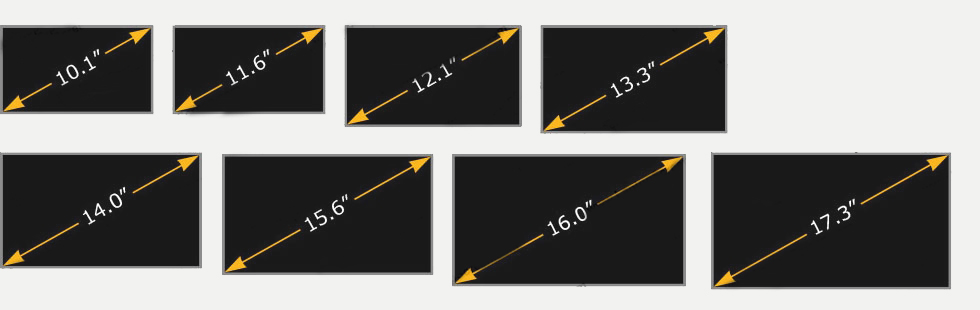
Laptop screens vary in size and new sizes are frequently introduced. See the most common sizes below. Screen size is measured in inches, diagonally from corner to corner (1 inch=2.54 cm) as shown in the video below:

Hours :
Minutes :
Seconds

10% dISCOUNT COUPON

MARCH10X

LAP GADGETS - EASY RETURNS

Easy Returns

Buy with confidence with our No RISK purchase. We offer 10 days free returns and 30 days moneyback guarantee in our products (click here) to know more.

f you aren’t 100% satisfied with this item you may return it or exchange it for free within 10 days after delivery. Simply bring it back to our store or mail it back to us with a free, pre-paid return label. After 10 days no free return eligible, you can still either self return or pay the return courier charges. 

I need to return an item.
Need help now? Let’s chat on whatsapp

First 100 customer offer

50%OFF

in installation charges.

Lap Gadgets Shipping Policy (India)

Free Shipping:

  • We offer free shipping within India for orders weighing up to 500 grams.

Delivery Time:

  • We aim to dispatch all orders within 24-48 hours of receiving your payment.
  • Standard delivery time is 3-7 business days after dispatch depending upon the pincode.

Tracking Your Order:

  • You will receive an email notification with tracking information once your order is shipped.
  • Please allow up to 24 business hours for the tracking number to become active on the courier’s website.

Order Changes & Cancellations:

  • You can request to cancel your order free of charge within 2 hours of placing it, provided it hasn’t been shipped yet.
  • If your order has already been shipped, you will be responsible for all shipping charges (original and return)/

Returns & Replacements:

  • We offer a 7-day easy return policy for defective items. We will provide you with a pre-paid return label for free returns within this period.
  • Defective or Dead-on-Arrival (DOA) items can be replaced free of charge. Please notify us within 10 days of delivery via email at help@lapgadgets.co.in
  • Replacement options may vary depending on stock availability.

Important Notes:

  • We currently only offer delivery within India.
  • We use a predetermined courier service to ensure fast and reliable delivery. The specific courier company will be assigned based on your order and location.
  • In rare cases where reverse pickup is unavailable, you may be required to return the product at your own expense.

Contact Us:

If you have any questions regarding our shipping policy, please don’t hesitate to contact us via email at help@lapgadgets.co.in 

Lap Gadgets Warranty Policy (India)

Lap Gadgets offers a warranty on all our laptop parts to ensure customer satisfaction and protect against manufacturing defects. The warranty period varies depending on the part category:

Warranty Coverage:

  • This warranty covers defects in materials and workmanship under normal use.
  • Lap Gadgets will repair or replace, at its discretion, any defective parts covered by this warranty.

Warranty Periods:

  • Batteries: 6 Months to 12 months Limited Warranty
  • Chargers: 6 Months Limited Warranty (No warranty for power cables supplied with charger / adapter)
  • Keyboards: 3 months Limited Warranty
  • Screens: 3 to 12 months Limited Warranty

What’s Not Covered:

  • This warranty does not cover any damage caused by:
    • Accidental drops, spills, burn or electrical surges or swollen batteries.
    • Misuse, neglect, or improper installation.
    • Unauthorized repairs or modifications.
    • Normal wear and tear.
    • Temper of serial numbers or any other stickers on the item
  • This warranty is void if the warranty sticker is tampered with or removed.

How to Make a Warranty Claim:

  • To make a warranty claim, please contact Lap Gadgets customer support within the applicable warranty period at support@lapgadgets.co.in 
  • You will be required to provide a copy of your purchase receipt and a brief description of the issue.
  • Our customer support team will then guide you through the return process and advise you on the estimated repair or replacement timeframe.

Additional Information:

  • Lap Gadgets reserves the right to replace any defective part with an equivalent or refurbished part.
  • This warranty is offered by Lap Gadgets and is not transferable.

Contact Us:

If you have any questions regarding our warranty policy, please don’t hesitate to contact us via email at support@lapgadgets.co.in 

Lap Gadgets - Return and Replacement Policy

returns

At  Lap Gadgets, we are committed to ensuring your satisfaction with every purchase. Our return and replacement policy is designed to provide you with peace of mind and convenience. Below are the details of our policy:


Replacements:

Following the fulfillment of your order, we offer a hassle-free replacement process. Key points regarding replacements include:

Return Period :  

Laptop Batteries & Chargers –  7 days Return window  

Laptop Keyboard  – 7 days return window

Laptop Screen –  3 days return window –  Returns applicable only if the item comes in damage condition or different item received – No returns for color variation issue – birghtness or any other reasons. 

 Laptop Body case / hinges / SSD / Ram / – Returns applicable only if the item come in damage condition or different item received (no color variation return will not accepted). NO returns applicable for other reasons. 


  • Replacements are provided at no additional cost for products deemed Dead-on-Arrival (DOA) or faulty. Customers must promptly notify us of such issues through email at support@lapgadgets.co.in within returns window (as per item) after order delivery.
  • In cases where reverse pickup service is unavailable from our logistics partners, customers are responsible for returning the products to Lap Gadgets at their own expense and risk.
  • Replacement orders will be processed once the claimed DOA or faulty product has been returned to Lap Gadgets and verified by our representatives to be free from tampering.
  • Tampered products, serial number tempered, any film on screens or box missing will not be eligible for replacement or refund.

Returns:

Products may be returned within 7 days of the delivery date under the following circumstances:

  • Dead-on-Arrival (DOA)
  • Defective products (not functioning as per product documentation)
  • Physically damaged products (reportable within 24 to 48 hours of delivery)
  • Delivery of an incorrect product ( not fit with laptop)

Returns meeting the above criteria are eligible for a full refund or a free replacement, depending on the customer’s preference.

However, returns initiated due to customer error or compatibility issues occurs due to wrong purchase will incur a 10% deduction from the order value, along with actual two-way logistic charges. We strongly advise customers to seek clarification from our representatives prior to placing their order to avoid such situations.

Important Guidelines:

To ensure a successful return or replacement, customers must adhere to the following guidelines:

  • Maintain the items in their original condition, including the brand outer box, MRP tags/stickers, user manual, warranty cards, protective layer on screen or other parts and all original accessories in manufacturer packaging.
  • Return the concerned products to our warehouse in their original packaging, with all original components, manuals, accessories, and warranty cards.
  • We cannot be held responsible for delays caused by technical glitches or factors beyond our control, including those involving our partners and vendors.
  • Refunds or replacement dispatches will be processed once our experts have verified the reason for return or replacement.
  • Refunds typically take 7-10 business days to reflect in the original method of payment after we recieve the product return.

For any inquiries or assistance, please feel free to contact us. We are here to help.

All returned products undergo rigorous testing supervised by expert technicians selected by Lap Gadgets to ensure accuracy. Requests for returns of products found to be functioning correctly, as per their documentation, will be declined.

Thank you for choosing Lap Gadgets. Your satisfaction is our priority.

Lap Gadgets Cancellation Policy (India)

Lap Gadgets understands that there may be situations where you need to cancel your order. Here’s our policy to ensure a smooth experience:

Order Cancellation:

  • You can cancel your order free of charge within 2 hours of placing it.
  • To cancel your order, please contact our customer support team as soon as possible via email at help@lapgadgets.co.in or by phone at 0261-4517787 OR whatsapp us on : 7859818378

Important Notes:

  • You’re free to cancel your order anytime before it’s shipped out. If the package has already been sent, you can simply decline the delivery. Once the items make their way back to our warehouse, we’ll issue a refund—provided the payment was completed.

Charges & Guidelines for Cancellation

You can cancel your order before it moves into the final packing or shipping stage.

For shipped orders paid in advance, a small fee of 5% will be subtracted to recover processing and platform expenses.
If the payment was made using EMI, BNPL options, or international cards, the fee rises to 10% due to additional handling charges.

  • We reserve the right to cancel orders due to stock unavailability, pricing errors, or fraud concerns. We will notify you in such cases and provide a full refund for any pre-payments made.

Timeframe for Refunds:

  • Once your cancellation request is confirmed, we will initiate a refund for the canceled amount within 48 business hours.
  • The refund will be processed through the original payment method used while placing the order.
  • Depending on your bank or payment processor, it may take an additional 3-5 business days for the refunded amount to reflect in your account.

Contact Us:

If you have any questions regarding our cancellation policy, please don’t hesitate to contact us via email at help@lapgadgets.co.in or by phone at 0261-4517787 OR whatsapp us on : 7859818378

Your safety is our highest priority:

We use industry best tools to protect your valuable data and privacy. Our payment security system encrypts your information throughout transmission. We never share your credit card details with any third-party vendors, and we don’t sell your information to others. 

security

LAP GADGETS - EASY RETURNS

Easy Returns

Buy with confidence with our No RISK purchase. We offer 10 days free returns and 30 days moneyback guarantee in our products (click here) to know more.

f you aren’t 100% satisfied with this item you may return it or exchange it for free within 10 days after delivery. Simply bring it back to our store or mail it back to us with a free, pre-paid return label. After 10 days no free return eligible, you can still either self return or pay the return courier charges. 

I need to return an item.
Need help now? Let’s chat on whatsapp

LAP GADGETS CUSTOMER SATISFACTION PROMISE

Buy with confidence with our No RISK purchase. We offer 7 days free returns and 15 days moneyback guarantee in our products (click here) to know more.

Easy Returns
Shipping Across India

Free shipping across nation for selected products. Shop at lapgadgets.co.in with confidence by mode of Cash on delivery / credit / debit card in selected cities. With more than 26000 pin code covered in India.

You can shop at lapgadgets.co.in with confidence. We have partnered with Paytm & Razorpay, a leading payment gatewayin India, to accept credit / debit  cards, netbanking, wallet payment and electronic check payments safely and securely for our customers.

SING UP
Secured Transaction
Excellent Support

Best in class customer support. We consider your issues as ours. We are available  watsapp (click here) or mail us your query at help@lapgadgets.co.in. Timings are 10:30 am to 6.30 pm 

Get experts advice in buying correct laptop parts. Avoid the risk of laptop failure and other damage which may occur due to wrong part purchase. Our experts will be happy assisting you.

Expert's Advice

Online. In store. Always free.

If you aren’t 100% satisfied with this item you may return it or exchange it for free within 10 days after delivery. Simply bring it back to our store or mail it back to us with a free, pre-paid return label. After 10 days no free return eligible, you can still either self return or pay the return courier charges. 

I need to return an item.

Need help now? Let’s chat on whatsapp.