If your Xiaomi RedmiBook Pro 15 is no longer holding a charge, shuts down when disconnected from the charger, or shows significantly reduced battery life, replacing the internal battery may be the most practical solution.
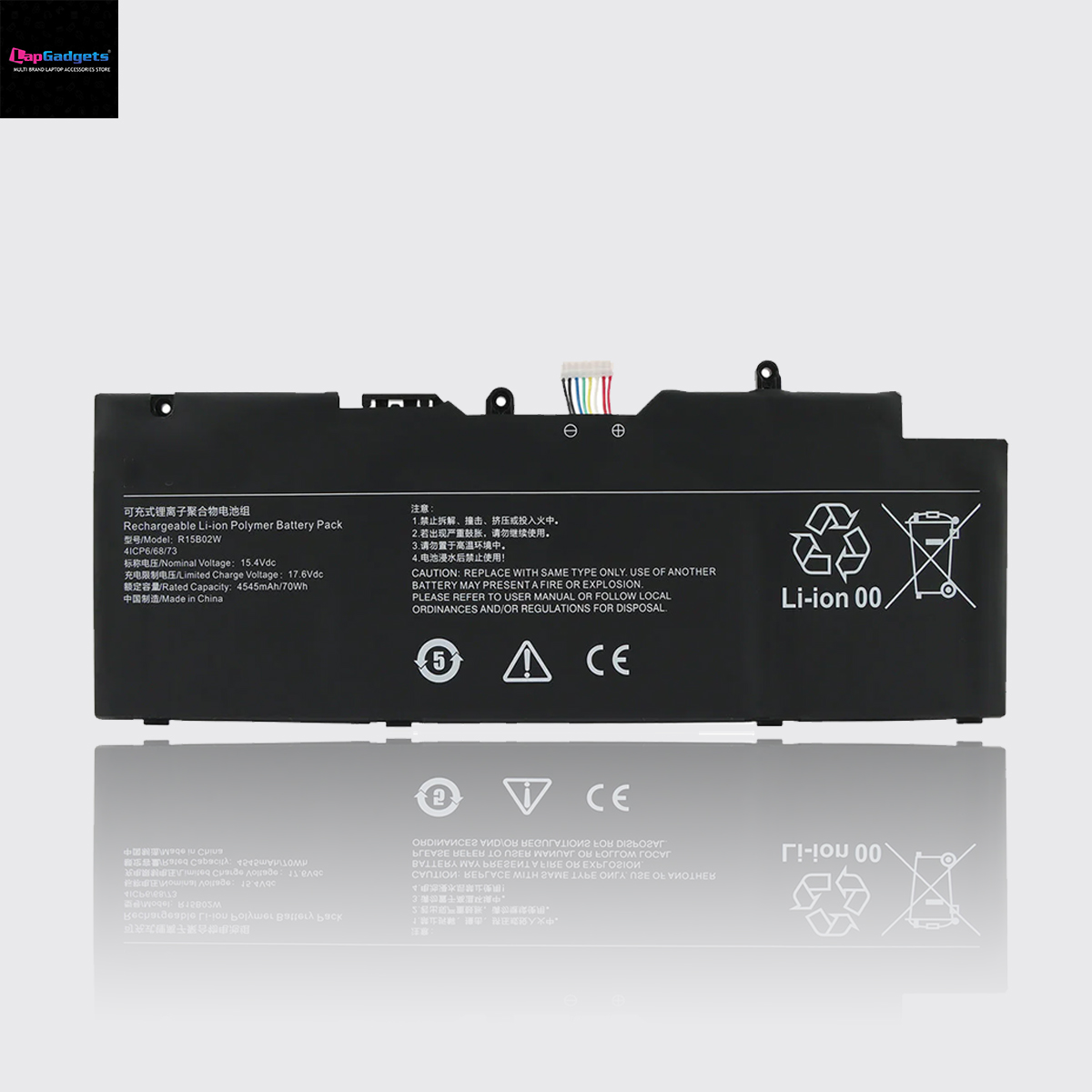
The R15B02W replacement battery is designed for compatible Xiaomi RedmiBook Pro 15 and RedmiBook Pro 15 2021 models. This battery is commonly identified by references such as R15B02W, R15B0ZW, and 4ICP6/68/73.
However, choosing the correct laptop battery is not only about matching the laptop brand and screen size. The battery part number, voltage, connector, physical design, and laptop model should all be checked before purchasing a replacement.
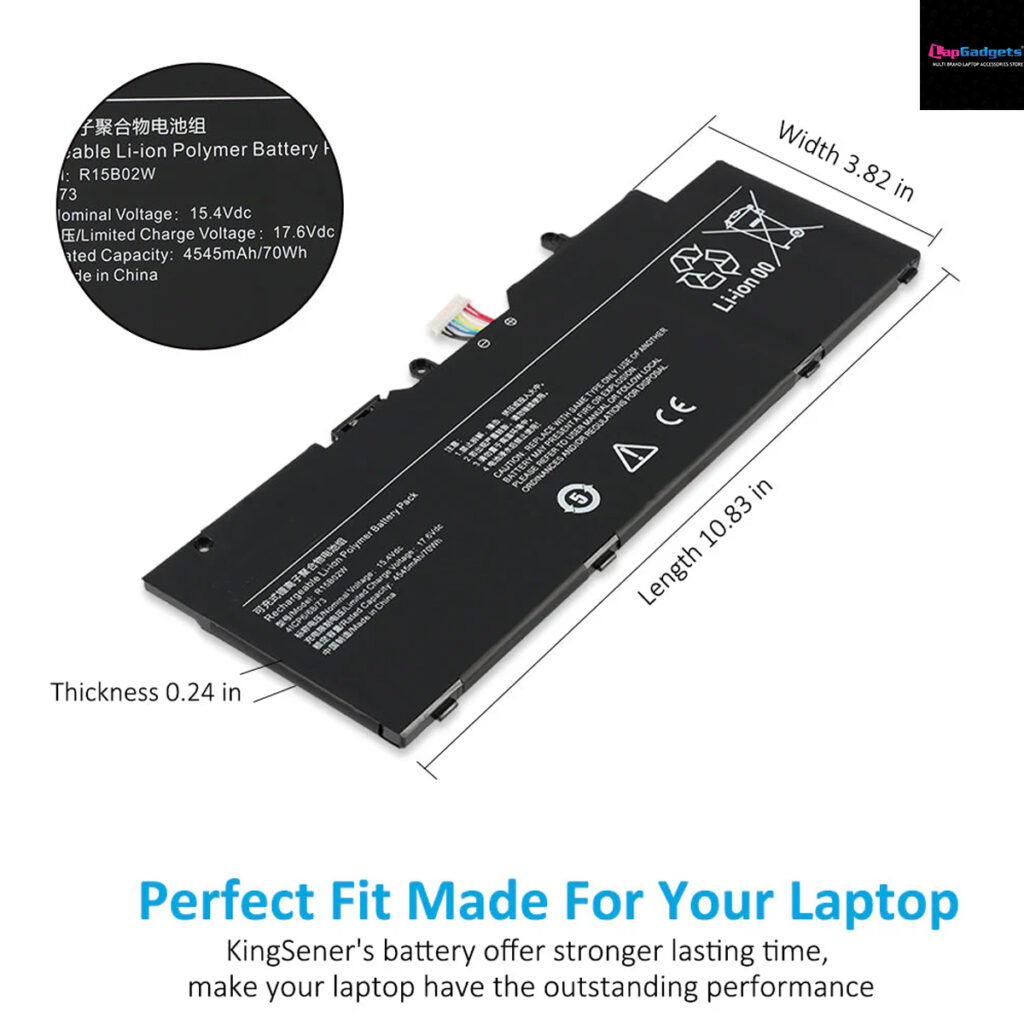
R15B02W Battery Specifications
| Specification | Details |
|---|---|
| Battery Model | R15B02W |
| Alternate Reference | R15B0ZW |
| Battery Type | Lithium-Ion |
| Cell Configuration | 4-Cell |
| Voltage | 15.4V |
| Capacity | 70Wh |
| Rated Capacity | 4545mAh |
| Battery Identification | 4ICP6/68/73 |
| Designed For | Compatible Xiaomi RedmiBook Pro 15 Series |
The 70Wh capacity provides a substantial energy reserve for a performance-oriented 15-inch laptop. Actual battery runtime depends on factors such as processor usage, display brightness, Wi-Fi activity, background applications, and battery condition.
Compatible Xiaomi RedmiBook Pro 15 Laptop Models
This battery is designed for compatible models in the following series:
Xiaomi Laptop Series
- Xiaomi RedmiBook Pro 15 Series
- RedmiBook Pro 15 2021 Series
- Redmi Pro 15 Series 2021
- Redmi Pro 15 R5
- Redmi Pro 15 R7
Compatible Model Numbers
- XMA2007-BJ
- XMA2007-BB
- XMA2007-AJ
- XMA2007-AB
Important: Laptop model names can sometimes be similar across different regional or hardware configurations. Always compare the battery label and part number inside your laptop before ordering.
Compatible Replacement Battery Part Numbers
The R15B02W battery may be identified using several part numbers and battery references.
Replacement Part Numbers
- R15B02W
- R15B0ZW
- 4ICP6/68/73
These references are particularly useful when searching for a replacement battery online.
A laptop may be listed under one model number while the battery itself carries a different part number. This is why searching using the battery part number printed on the original battery is often the most reliable way to find a replacement.
How to Check Whether You Need a New Battery
Before purchasing a replacement, look for the following symptoms.
1. Laptop Shuts Down When the Charger Is Removed
If the laptop works normally while connected to the charger but immediately shuts down when the charger is disconnected, the internal battery may have reached the end of its usable life.
2. Battery Runtime Has Become Extremely Short
A new battery may provide several hours of usage depending on the laptop configuration and workload.
If your laptop previously lasted several hours but now runs for only a short period, the battery’s available capacity may have significantly degraded.
3. Battery Is Not Charging
Possible causes include:
- A worn-out battery
- Faulty charging adapter
- Charging circuit issue
- Battery connector problem
- Operating system or driver issue
If the charger works correctly and the battery is not charging or retaining power, battery replacement may be required.
4. Battery Percentage Drops Suddenly
A battery that goes from 40% to 10% unusually quickly may have significantly reduced capacity or inaccurate battery calibration.
This is a common sign that the battery is no longer storing energy as efficiently as it originally did.
5. Unexpected Laptop Shutdowns
If your Xiaomi RedmiBook Pro 15 suddenly switches off even though Windows shows remaining battery power, the battery may be unable to provide stable power under load.
6. Battery Swelling
A swollen battery should be treated seriously.
If you notice:
- The laptop bottom cover is bulging
- The touchpad is raised
- The laptop does not sit flat
- The battery physically looks swollen
Stop using the laptop and replace the battery as soon as possible.
Do not puncture, bend, crush, or continue using a visibly swollen lithium-ion battery.
How to Find the Battery Model Inside Your Laptop
Before ordering a replacement, carefully check the label on the existing battery.
Look for one or more of these references:
R15B02W
R15B0ZW
4ICP6/68/73
You should also check the following:
- Battery voltage
- Battery capacity
- Connector position
- Number of cells
- Physical size
- Screw and mounting locations
For the compatible battery discussed in this guide, the key specifications are:
15.4V | 70Wh | 4545mAh | 4-Cell Li-ion
Is a 15.4V Battery Compatible With Your RedmiBook Pro 15?
Voltage is an important specification when replacing a laptop battery.
The R15B02W battery is designed with a 15.4V nominal voltage and a 70Wh capacity.
However, customers should not select a battery based on voltage alone. A correct replacement should also match:
- Battery model number
- Laptop compatibility
- Voltage
- Connector
- Physical design
- Mounting position
A battery with a similar voltage but a different connector or physical configuration may not be a suitable replacement.
R15B02W vs R15B0ZW: Are They Related Battery References?
Customers may find different battery references when searching for a replacement.
The following references are associated with this compatible battery family:
- R15B02W
- R15B0ZW
- 4ICP6/68/73
Because battery part numbers can vary between listings, regions, and manufacturer references, the safest approach is to compare the complete battery label and specifications rather than relying on a single search term.
Should You Replace the Battery or Buy a New Laptop?
For many users, replacing the battery is significantly more practical than replacing the entire laptop.
A battery replacement may be a sensible choice if:
- The laptop still performs well
- The display is working correctly
- The keyboard and touchpad are in good condition
- The motherboard is functioning properly
- The laptop meets your performance requirements
A worn-out battery does not necessarily mean the entire laptop needs to be replaced.
A properly compatible replacement battery can help restore portable usage and extend the practical life of the laptop.
What to Check Before Buying an R15B02W Battery
Before ordering a replacement battery, verify:
✅ Battery Part Number
Check for:
- R15B02W
- R15B0ZW
- 4ICP6/68/73
✅ Laptop Model
Check whether your laptop belongs to a compatible model series, such as:
- RedmiBook Pro 15 Series
- RedmiBook Pro 15 2021
- Redmi Pro 15 R5
- Redmi Pro 15 R7
✅ Model Number
Compatible references include:
- XMA2007-BJ
- XMA2007-BB
- XMA2007-AJ
- XMA2007-AB
✅ Technical Specifications
The replacement battery should match the required:
- 15.4V voltage
- 70Wh capacity
- 4545mAh rating
- 4-cell Li-ion design
Why Battery Testing and Compatibility Verification Matter
A replacement battery is not simply a product that should be selected based on the lowest price.
A proper battery replacement should be:
- Correctly matched to the laptop
- Checked for the correct battery specifications
- Tested before dispatch
- Packed safely
- Covered by appropriate warranty support
At Lap Gadgets, customers can get expert assistance when they are unsure about battery compatibility. A simple photo of the existing battery label can often help verify the correct replacement before ordering.
Frequently Asked Questions
What battery replaces R15B02W?
The compatible replacement battery is commonly identified by references including R15B02W, R15B0ZW, and 4ICP6/68/73.
Which laptops use the R15B02W battery?
The battery is designed for compatible models in the Xiaomi RedmiBook Pro 15 and RedmiBook Pro 15 2021 series, including model references such as XMA2007-BJ, XMA2007-BB, XMA2007-AJ, and XMA2007-AB.
What is the capacity of the R15B02W battery?
The battery has a 70Wh capacity and a 4545mAh rating.
What voltage is the R15B02W battery?
The battery is rated at 15.4V.
Is R15B02W a lithium-ion battery?
Yes. The battery uses a 4-cell Lithium-Ion configuration.
How do I know if my Xiaomi RedmiBook Pro 15 battery needs replacement?
Common signs include very short battery life, unexpected shutdowns, failure to charge, the laptop turning off immediately when the charger is disconnected, and visible battery swelling.
Can I replace the battery myself?
Battery replacement should be performed carefully because lithium-ion batteries can be damaged by bending, puncturing, or incorrect handling. If you are not experienced with laptop repair, professional installation is recommended.
Final Buying Checklist
Before purchasing a replacement battery for your Xiaomi RedmiBook Pro 15, verify:
Laptop Series: Xiaomi RedmiBook Pro 15
Battery Part Number: R15B02W / R15B0ZW
Battery Reference: 4ICP6/68/73
Voltage: 15.4V
Capacity: 70Wh
Rating: 4545mAh
Configuration: 4-Cell Li-ion
Model References: XMA2007-BJ, XMA2007-BB, XMA2007-AJ, XMA2007-AB
If all these details match your existing battery and laptop configuration, you are much more likely to select the correct replacement battery.